
Download Tinfoil Security – Security, Penetration Testing, Web Security
Overview
Tinfoil Security is a desktop application designed to simplify web application security through automation. Its primary purpose is to perform automated penetration testing on web applications, identifying potential vulnerabilities in user input points such as forms, links, cookies, and headers. By focusing exclusively on the web application layer, the tool streamlines the security assessment process for developers, security teams, and organizations seeking to proactively address weaknesses before exploitation.
The software is ideal for professionals managing web-based platforms who need a reliable, user-friendly method to test for common security flaws like injection attacks, cross-site scripting (XSS), and insecure data handling. It is particularly beneficial for small to medium-sized development teams without dedicated security specialists, as it reduces the complexity of vulnerability detection. The tool enables users to initiate scans by simply entering a URL, with the ability to schedule recurring tests for continuous monitoring.
While the developer, Tinfoil Security, is known for its focus on automation and ease-of-use, specific details about the company’s background or history were not provided. The application operates in a real-world context where web applications are frequently targeted, making consistent security testing essential. By automating the reconnaissance and exploitation phases of a penetration test, Tinfoil Security helps users maintain a stronger security posture without requiring deep expertise in ethical hacking.
Key Features & Capabilities
- Automated Web Application Scanning – The tool crawls websites to identify all potential user input points, including forms, URLs, cookies, and HTTP headers, enabling comprehensive coverage of attack surfaces.
- Automated Vulnerability Exploitation Testing – Once input points are discovered, the software automatically injects malicious payloads to test for vulnerabilities such as SQL injection, XSS, and command injection.
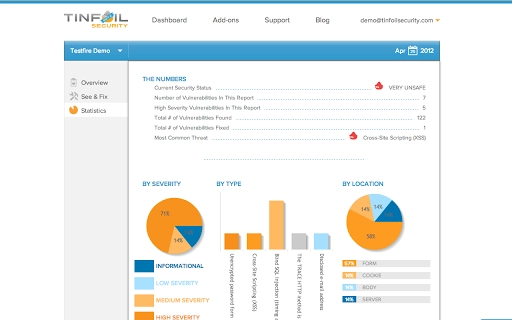
- Real-Time Vulnerability Reporting – Detailed reports are generated upon detection of any issues, including exact location, nature of the vulnerability, and technical details of the exploit.
- Attack Replay Functionality – Users can replay the attack sequence to verify findings and better understand how the vulnerability was triggered.
- Customized Fix Guidance – The tool provides tailored, step-by-step instructions for remediation, specifically adapted to the user’s software stack, reducing the time and effort required to patch issues.
- Scheduled Scanning – Users can set up recurring scans to ensure ongoing security monitoring, helping maintain compliance and detect new vulnerabilities over time.
These capabilities are particularly useful in development workflows where frequent code updates introduce new risks. For example, a web developer can schedule a scan after each deployment to ensure no new vulnerabilities are introduced. Similarly, a security analyst can use the tool to validate the effectiveness of input sanitization across multiple endpoints.
User Interface, Workflow & Performance
The user interface of Tinfoil Security is designed with simplicity and efficiency in mind, prioritizing ease of use for both technical and non-technical users. The main screen allows users to input a target URL and initiate a scan with minimal configuration. Navigation is straightforward, with clear labels and logical grouping of functions such as scan initiation, report viewing, and scheduling options.
Workflow efficiency is enhanced by the automation of repetitive tasks. After entering a URL, the software handles crawling, payload injection, and result analysis without requiring user intervention. This reduces the time needed to conduct a full penetration test from hours to minutes. The interface displays real-time progress during scans, offering transparency into the process.
Performance details were not specified by the developer. However, based on general software behavior, the tool is expected to manage moderate resource usage during scans, particularly when analyzing large websites with many endpoints. The developer did not provide additional system requirements or resource usage metrics. Stability during long-running scans was not documented. Users should expect typical performance patterns for desktop security utilities, with responsiveness maintained during idle periods.
Compatibility & System Requirements
Tinfoil Security is compatible with both Windows and Mac operating systems, making it accessible to a broad range of users across different environments. The software version is 1.0, with an installation size of 500 MB. This size suggests the application includes a full suite of scanning engines, libraries, and reporting tools.
Exact system requirements were not listed. The developer did not specify minimum CPU, RAM, or storage needs. Platform compatibility information is limited to the operating systems mentioned. Users should ensure their system meets general standards for running desktop applications, particularly those involving network scanning and data processing.
For users on older systems or those with limited resources, it is recommended to test the software in a controlled environment before full deployment. The lack of detailed system specifications means users may need to rely on trial installation to assess performance on their hardware.
Pros and Cons
Pros
- Automated penetration testing reduces manual effort and time.
- Intuitive interface suitable for non-experts and professionals alike.
- Provides actionable, stack-specific remediation guidance.
- Supports scheduled scans for continuous security monitoring.
- Offers attack replay for verification and training purposes.
- Free to use, making it accessible for small teams and independent developers.
Cons
- Exact system requirements were not provided.
- Performance under heavy load or on large websites was not specified.
- Only focused on web application-level security, not broader cybersecurity aspects.
- Limited information on update frequency and support model.
- May not detect zero-day vulnerabilities due to reliance on known exploit patterns.
FAQ Section
Is Tinfoil Security compatible with Windows and Mac?
Yes, Tinfoil Security is designed to run on both Windows and Mac operating systems.
Is the software safe to use on production websites?
While the tool is intended for security testing, users should exercise caution when scanning live production environments. It is recommended to test on staging or development instances first.
Does Tinfoil Security require an internet connection?
The application requires an internet connection to perform scans, as it accesses external exploit libraries and sends results to its backend for processing.
Can I use Tinfoil Security offline?
Based on available information, the software does not support fully offline operation, as scanning and reporting depend on online resources.
What kind of license does Tinfoil Security use?
Tinfoil Security is available free of charge. The exact license type was not specified in the provided information.
Final Thoughts + CTA
Tinfoil Security delivers a powerful yet accessible solution for automated web application security testing. Its focus on usability, automation, and actionable remediation makes it a valuable asset for development and security teams aiming to strengthen their digital defenses. While detailed technical specifications are limited, the tool’s core functionality is robust and well-suited for continuous security validation.
It is particularly beneficial for developers, security analysts, and organizations managing web platforms who want to detect and fix vulnerabilities efficiently. The inclusion of attack replay and stack-specific fixes adds significant practical value.
Despite the absence of detailed system requirements and performance data, the tool’s free pricing and strong feature set justify its adoption for teams seeking reliable, automated security testing. Download Tinfoil Security now to enhance your web application security with confidence.







